


Ask Zappy
Ready · answers from the manual
Found in the manual:
In the app, Ask ZapRoute writes the answer from these pages.
Routes, photo proof, chemistry, money and the truck — one app runs the whole pool business. Your technicians see today's route, tap a house, take a photo. The AI names the service, catches anything suspicious and reads the strip for them. One button finds the best order for each route.
With Service done with photo on, when your tech logs the cleaning photo the homeowner gets a link to that visit: the photo, the date and the time, no password, no app. Turn on Reviews & referrals and that same page also asks for a neighbor who needs a pool guy, and for a Google review — the review ask is spaced out (from the 3rd visit, at most every 90 days, and it stops once they click), so a weekly customer isn't asked every week. Nothing extra to send. Want the full history? Your office can give each customer a separate 90-day pool page.
Texts go only to customers who said yes, and only when you switch them on.
Referrals are the #1 marketing channel for 65% of pool companies. State of Pool Service 2026
Six things you will not find in the apps most pool companies use — and the reason a pool company built its own app.
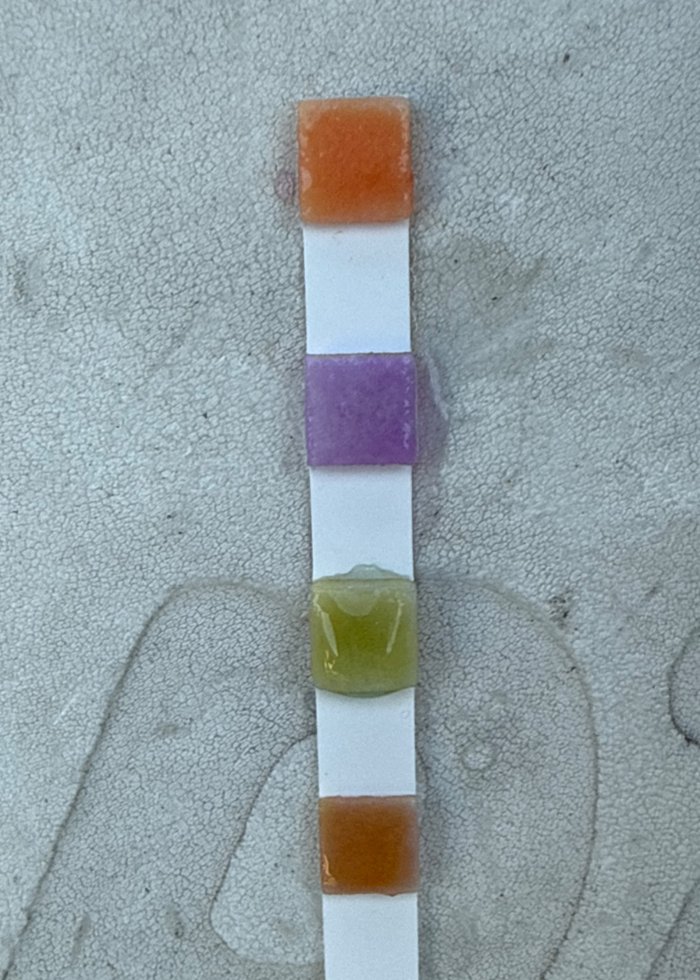
Point the camera at the strip; chlorine, pH, alkalinity and CYA fill in with a confidence score. Anything uncertain is marked CHECK for your office.
No photo, no visit. The AI names the service from the photo and flags duplicates, end-of-day dumps and fake timestamps — time verified on the server.
Base → first stop → … → last → base. Miles and fuel cost for every route; each technician's miles by week and month, and gallons and fuel cost per month.
Every product logged at the pool, priced the day it was added. The pools that cost 2× the average are shown for a price review.
No QuickBooks? ZapRoute keeps the balances and posts the monthly charge on the 1st. On QuickBooks? One switch and QuickBooks stays the truth — ZapRoute prepares the invoice lines.
English, Portuguese and Spanish on every screen. The technician opens the app and the day is already there.

The proof leaves the technician's hand — not a report typed up later.
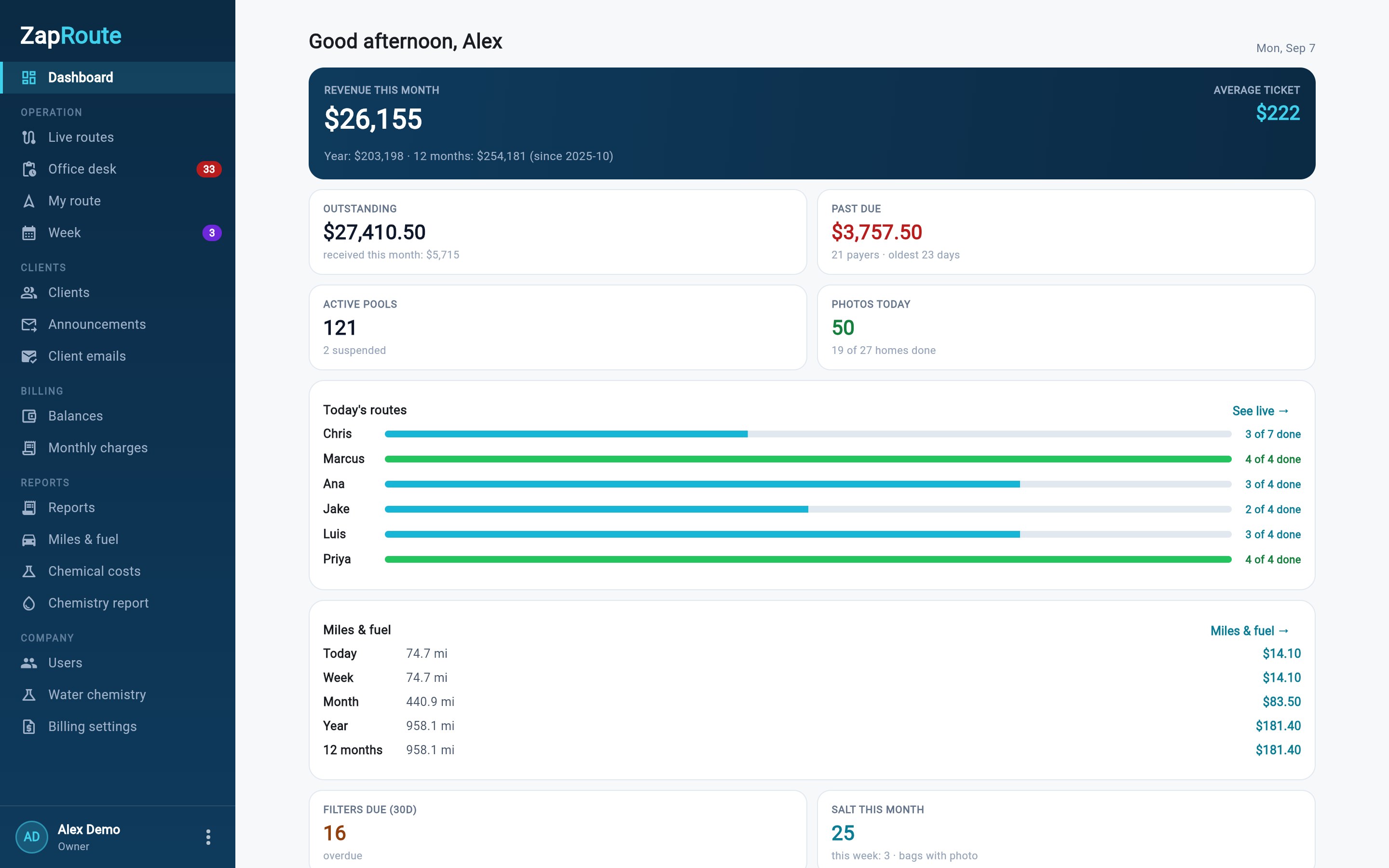
Money, chemistry, fuel, photos and the office desk — the same login the technician uses, with the numbers only the owner and the office see.
Click any screen to see it full size.
Sample data
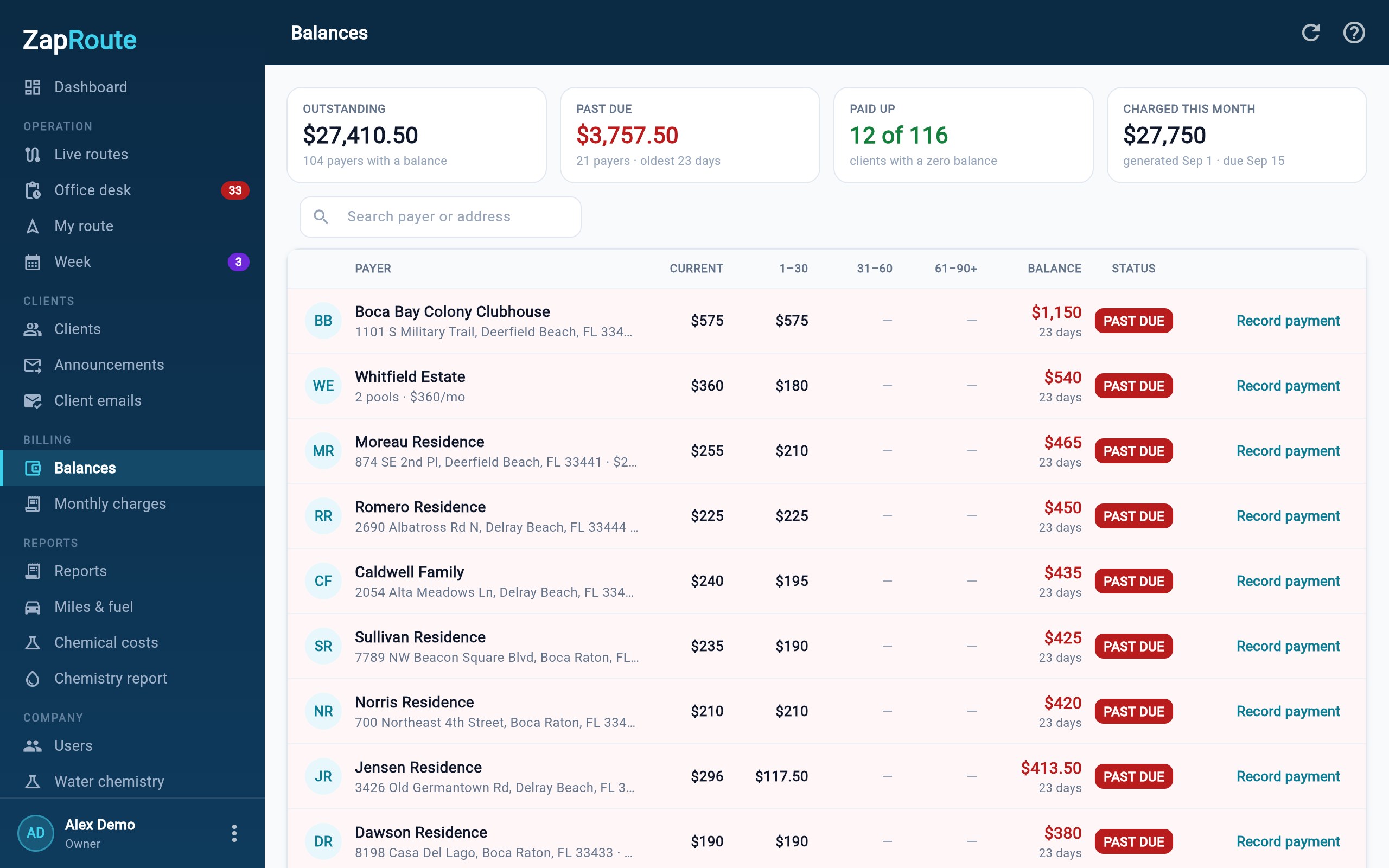
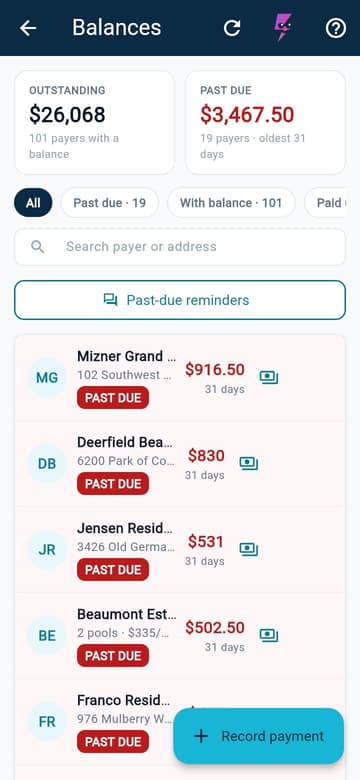
Outstanding, past due and paid-up in one table with aging buckets — or, in QuickBooks mode, the same table read straight from QuickBooks.
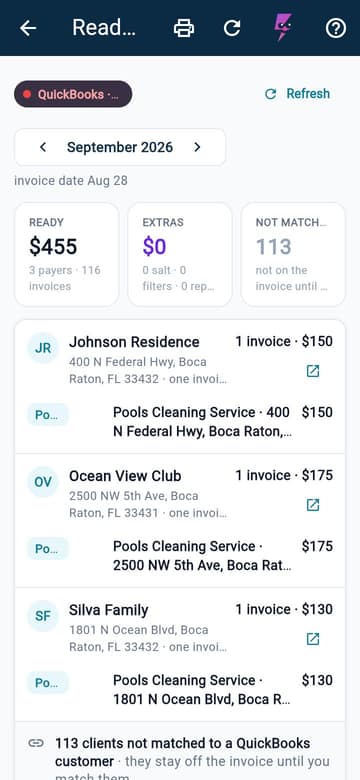
Every payer laid out like the invoice: the monthly line, salt and filters with date and photo, repairs on the monthly bill or on their own. Prepaid and already-invoiced greyed out.
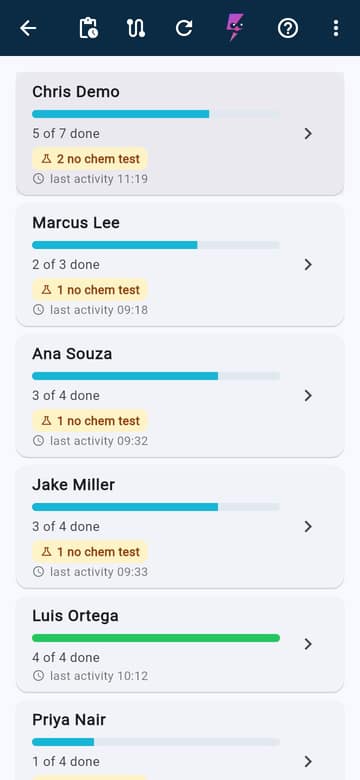
Six technicians at once: who is where, what was done, which photo is still on the phone waiting for signal — and the selected route with the last chemistry reading beside each house.
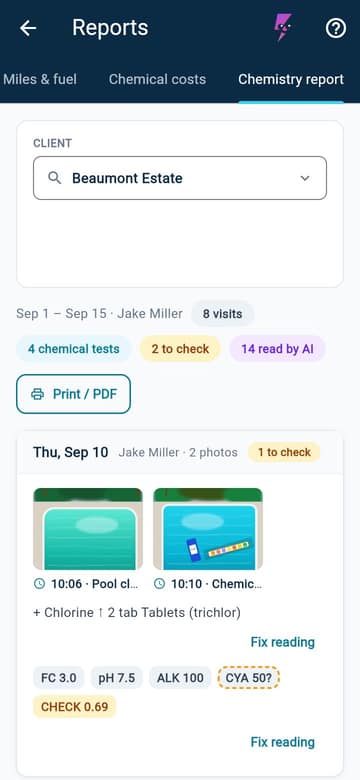
One client, one period, every visit: the photos, the readings with the AI confidence, what was out of range and what was added. Print or PDF for your records.
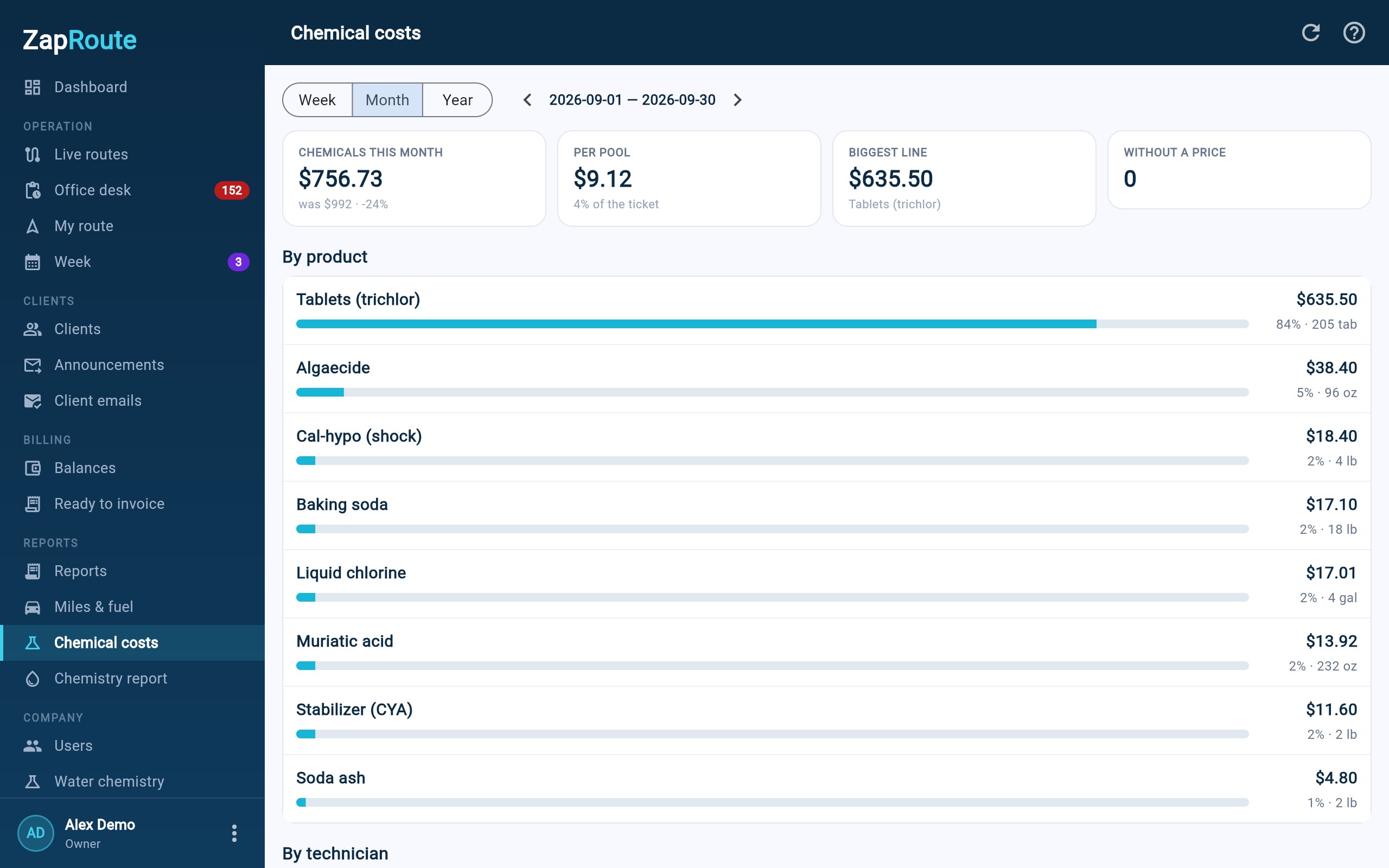
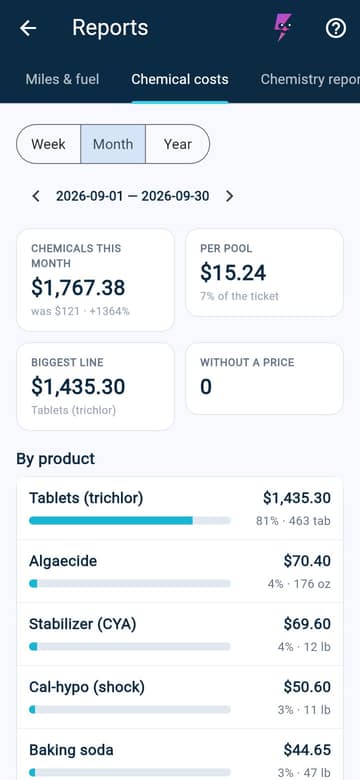
By product, by technician, by pool — week, month or year. Every product priced the day it was added, so you see what each pool really costs.
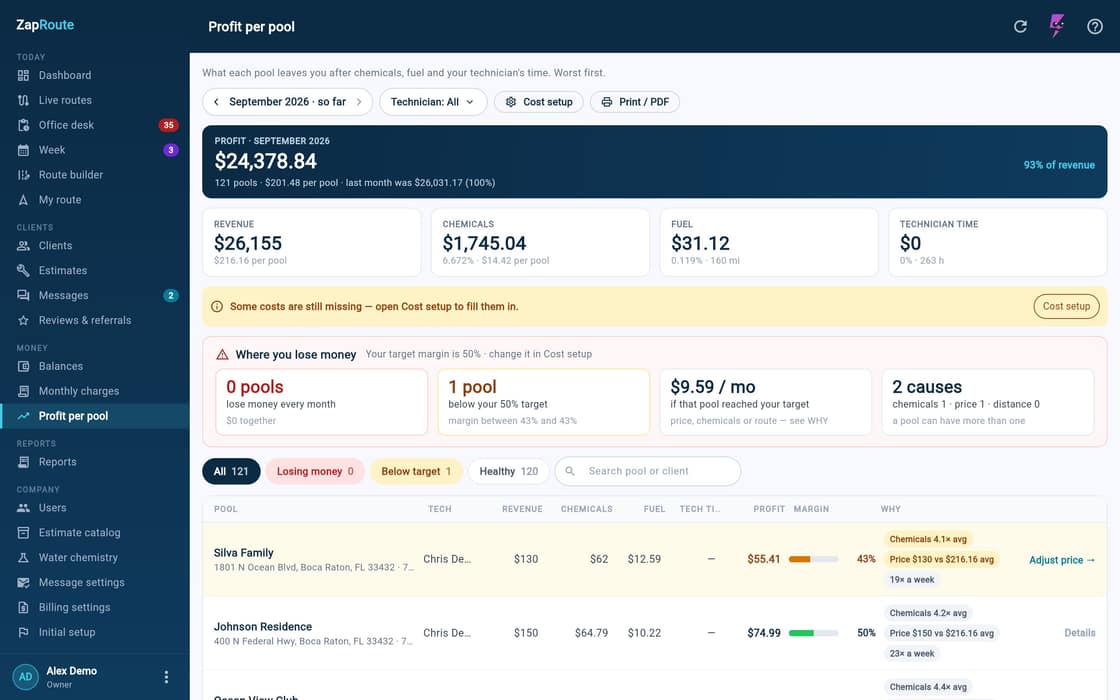
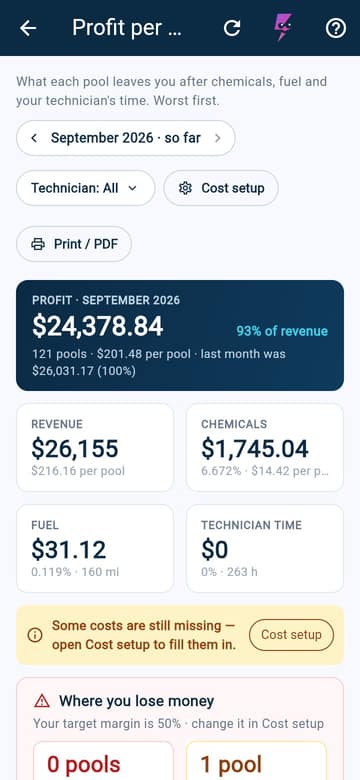
What each pool bills, minus the chemicals it drank, the fuel to get there and the minutes spent. The ones losing money are named, with the price that would fix them.
A visit flags a problem, the office builds the order, the customer approves by link — before and after, both with a photo.
Zero training. The technician opens the app and the day is already there — in the language they chose.
Chris's phone shows his Tuesday route: 7 homes, 17.2 miles, about 53 minutes of driving. The office's Live routes shows the same day: 6 routes, 0 of 26 homes done.
Chris taps Zimmerman Residence and takes the photo. The home turns green on his phone, and the photo shows up under Latest proof in the office: Chris 1 of 7, last activity 08:10.
At Prescott Residence there is no signal. The visit is saved on the phone and the home shows Photo pending, 4 minutes. The office sees 1 photo pending.
The signal returns and the phone says All photos uploaded. The office gets the Prescott photo, still marked with the time it was taken. Chris 3 of 7.
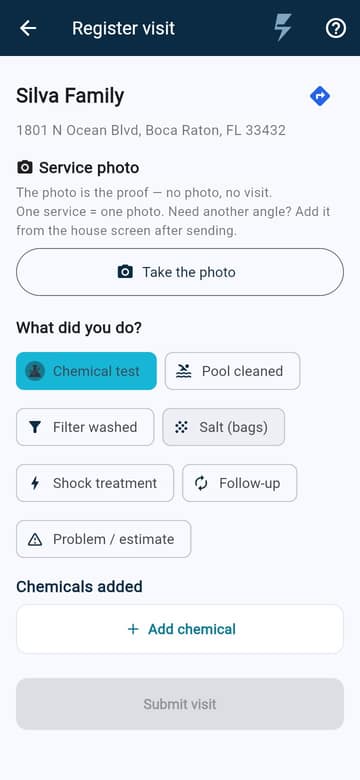
At Silva Family, Chris photographs the test strip. The AI reads free chlorine 3.0, pH 7.2, alkalinity 60 and CYA 80, and marks CYA as CHECK for a person to confirm. The office gets the chemical test: AI read 4 of 4, 1 to check. Chris 6 of 7.
Chris is back home: 7 of 7 homes, 17.2 miles, 53 minutes of driving, about $3.34 of fuel. The office shows his route done and 26 of 26 homes done.
What happens on the street shows up in the office — the minute the phone has signal.
Set your base and your truck once (mpg and fuel price). The route is measured base → first stop → … → last stop → base; each route shows its miles and fuel cost, and each technician gets miles by week and month, plus gallons and fuel cost per month.
A sample Tuesday: 7 pools and the drive from home. Reorder it yourself, change the truck — or let ZapRoute find the best order.
Move a pool with ↑ ↓, or drag it by the handle. The map, the miles and the fuel follow every change.
Three weekly routes on one map. Drop a new pool anywhere: ZapRoute checks every spot on every route and shows where it adds the fewest miles.
Nothing goes on a route until you tap a button.
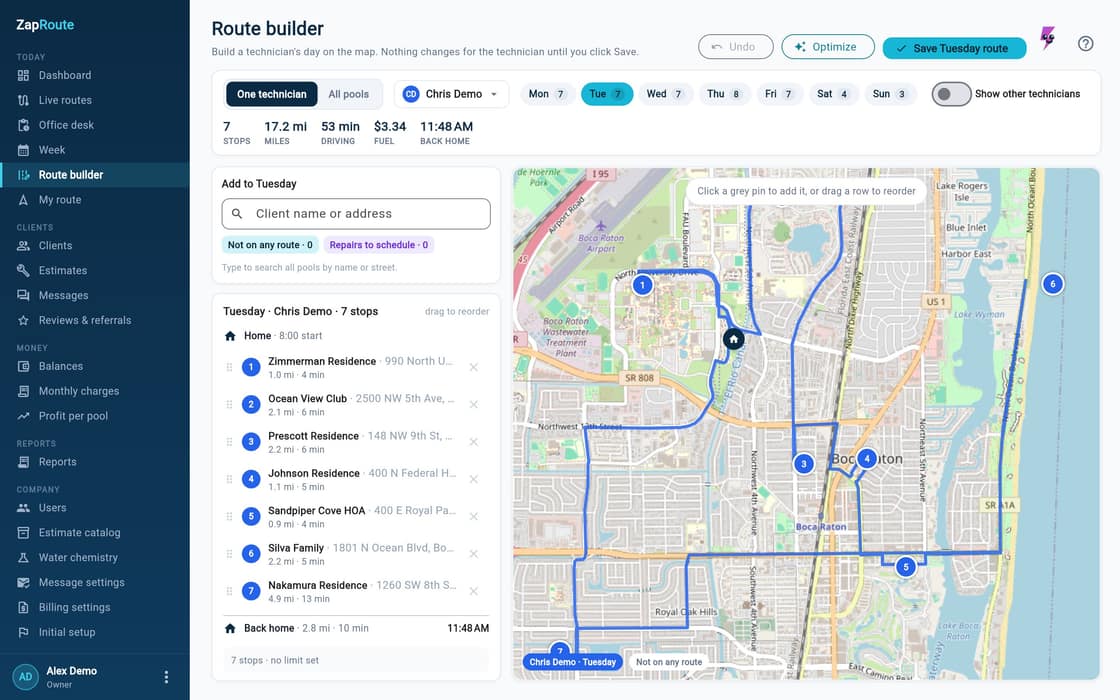
Every pool on the map. Pick the day and the technician, drag a house in or out, and the miles and the fuel change while you look. Save it and tomorrow's route is that one.
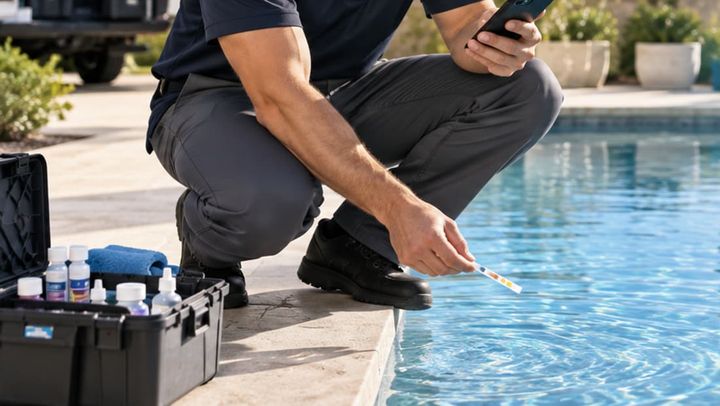
One photo of the strip on Register visit — the AI fills in the readings for the technician.
No photo, no visit. Every stop needs a picture before it counts — and the AI looks at every one of them.
Cleaning, chemical test or filter — the AI names it from the photo, and the technician can correct it for 30 minutes. Salt and shock stay one tap away.
Repeated photos, batch uploads at the end of the day, fake timestamps. Time is verified on the server, not on the phone.
The technician submits and moves on. Seconds later the AI reads the strip and the values land on the visit tagged AI — anything it wasn't sure about is marked CHECK for your office to confirm. The photo stays as the proof.
Past-due reminders and replies to your customers' texts, written by the AI and sent only when you approve.
The AI · strip reading
One photo of the test strip. The AI reads every pad against the bottle's color chart, gives each number a confidence score — and flags what a person should check.
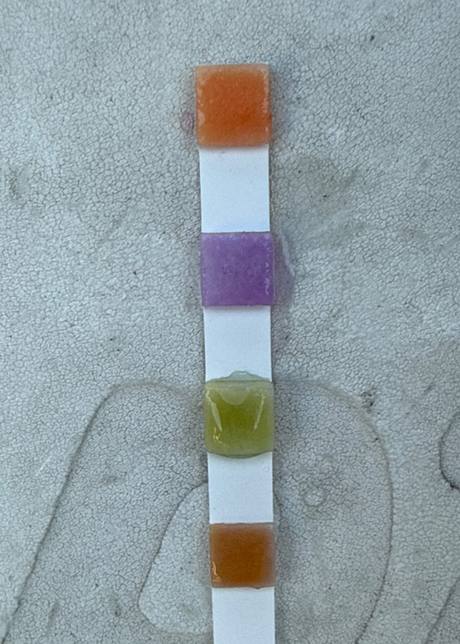
Real strip photo, shot on our own route.
Bottle color chart
Illustration. The AI reads the whole photo together with the bottle's chart — it is not a color meter. The lines show what it compares.
| Item | Reading | Confidence | Status |
|---|---|---|---|
| Free chlorine (ppm) | — | — | — |
| pH | — | — | — |
| Alkalinity (ppm) | — | — | — |
| CYA (ppm) | — | — | — |
on the bar = 0.75. Below it, the reading is marked CHECK.Dots: the color on the pad ≈ the chart swatch it matched.
Nothing read yet.
AI4 of 4 read · 1 to check
CHECK goes to the office. Nothing is final until a person looks.
Salt is not on the strip.
A model that is wrong is usually wrong with confidence. So ZapRoute also checks the pool's own history.
Two guards: the AI's confidence and the pool's history. The AI suggests. A person decides.
A real case from our own route: a strip that read pH 7.8 was stored as 6.8. Numbers here are sample data. A reading typed by hand is never marked, and a pool's first reading never is either.
Photo proof · anti-fraud
One technician's Tuesday: 8 proof photos. Three are tricks. Tap the ones you think are suspicious — then let ZapRoute check them.
What gets checked
Mark your suspects, then press Let ZapRoute check.
Check log
Nothing checked yet.
Tuesday · 3 flagged by the checks · the office decides



The office decides
The checks flag. You decide. And the honest technician is protected.
Also checked on every photo: batch uploads — 3 or more different places within 10 minutes. And on the technician's phone the photo always comes from the camera: there is no gallery button.
Every reading is tagged AI, and anything it isn't sure of is marked CHECK for a person. It never sends a message, bills a customer or changes a price on its own.
Photos get a second copy every night in a separate Google Cloud bucket. We don't sell data, and the app shows no ads.
Every screen, every message, every email — in the language each user picks.
Cada tela, cada mensagem, cada e-mail — no idioma que cada usuário escolhe.
Cada pantalla, cada mensaje, cada correo — en el idioma que cada usuario elige.
Ask Zappy · inside the app
When somebody has a question, Ask Zappy answers it inside the app — in English, Portuguese and Spanish, from the product manual and nowhere else. When the manual does not cover something, it says so instead of inventing a feature.
Tested on 202 real questions · average 8.8 / 10
Preset answers are excerpts from the manual. The real Ask runs inside the app.
Sky map: each of the 649 questions in the ZapRoute manual is drawn as a star, grouped into 8 galaxies by topic. The answers below are also given as text.
Try one
Ask Zappy
Ready · answers from the manual
Found in the manual:
In the app, Ask ZapRoute writes the answer from these pages.

Not routes, not photos, not reports — the certainty that the pool is ready when the family walks in.
Sign up and bring your pools in — paste the list or send a file — hand out the week in Route builder, and the technicians get their route in the morning.
Hey — I'm Zappy. I live inside ZapRoute, and I'm the one who reads the test strip from your tech's photo.
Ask me anything — or take a look around. I answer in English, Portuguese and Spanish, same as the app.
Try me on your own pools. Thirty days, no card, and I'll read your first strip today.
Hey — I'm Zappy. I live inside ZapRoute, and I'm the one who reads the test strip from your tech's photo.
Tap a question:
Your tech photographs the strip. I read free chlorine, pH, alkalinity and CYA — each value with how sure I am. Anything I'm unsure about I mark CHECK, and your office confirms it. Salt goes in by hand, and every product your tech adds is logged at your prices, so you see what each pool really costs.
Every visit leaves a photo you can trust. I check it: the same photo twice, a screenshot, a frame with no water — I flag it before your customer does.
$59 a month up to 60 pools, then a dollar a pool. We count the pools you serviced last month or the ones active on your routes today — whichever number is higher. Suspending at the end of the month doesn't lower it; the visits already happened. Until Feb 28, 2027, the first 20 companies that subscribe during their free trial, or up to 7 days after it, get 50% off their first 3 payments.
The route lives on the phone. Photos, readings and salt go up by themselves when the signal comes back. Your tech never waits on a bar.
Try me on your own pools. Thirty days, no card, and I'll read your first strip today.
Start free